A tour template is an itinerary that is not linked to a specific client. It contains the structure of a tour, such as days, destinations, activities, without personalized details like client names, exact dates, or prices.
Tour templates are designed to help you:
Build quotes faster
Reduce repetitive manual work
Share tours online with the Share Tours Add-on
Importing tour templates from Safaribookings
Creating a tour template manually
If you have a SafariBookings account, you can import all your active tours in SafariBookings as templates in SafariOffice. Once your accounts are connected, the importing of tour templates will happen automatically.


Go to Tour Templates
Click Create Tour Template button
On the open tab, manually fill in the tour details. These include the tour title, tour type, countries visited, start and end destination.
Click Create Template
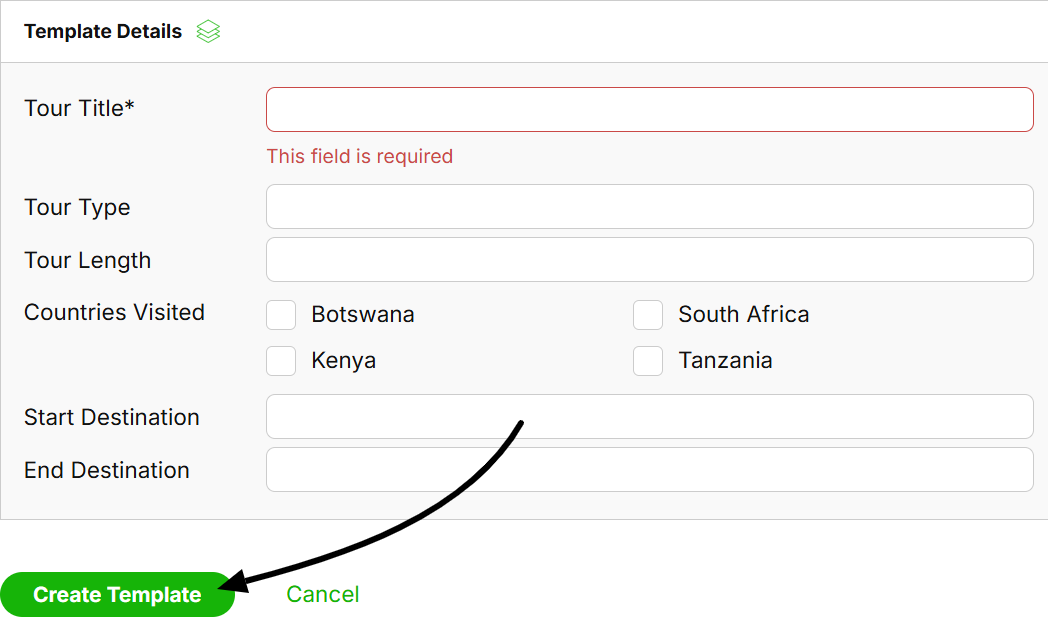
The template builder will open automatically
Follow the builder steps 1 to 4 (Add day-by-day itinerary, pricing, preview & edit, and SAVE)
The table below highlights the key differences between tour templates and quotes:
Feature | Tour Template | Quotes |
Client Personal Details | ❌ Not included | ✅ Included |
Names, Dates, Prices | ❌ Replaced with smart tags | ✅ Fully filled in |
Can Be Sent To Clients | ❌ No | ✅ Yes |
Purpose | Helps save time when creating a quote | Client-specific offer |
Final Builder Step | SAVE | Finish & Share |
How to Connect SafariOffice to SafariBookings
Learn how to connect SafariOffice and SafariBookings to sync requests and tours.
How to Copy a Tour Template
In this article, we'll see how to copy a tour template.
How to Save a Quote as Tour Template
Learn about how to save a quote as a tour template.
