The point of a safari is indeed the activities. laying these out in an enticing way withing your quotes will improve your chances of making a successful booking! Although the images and videos are incredibly important, it all begins at step 1 in the ‘day by day’ builder! Delve into the article to discover how to optimize your activities!

To add activities you need to navigate to the quote or template in question. Thereafter you will see the column labelled ‘Activities’.
If you click on ‘+ Add Activities Day X’ for any of the days in question you can begin to add details like the activity type, location, and moment.
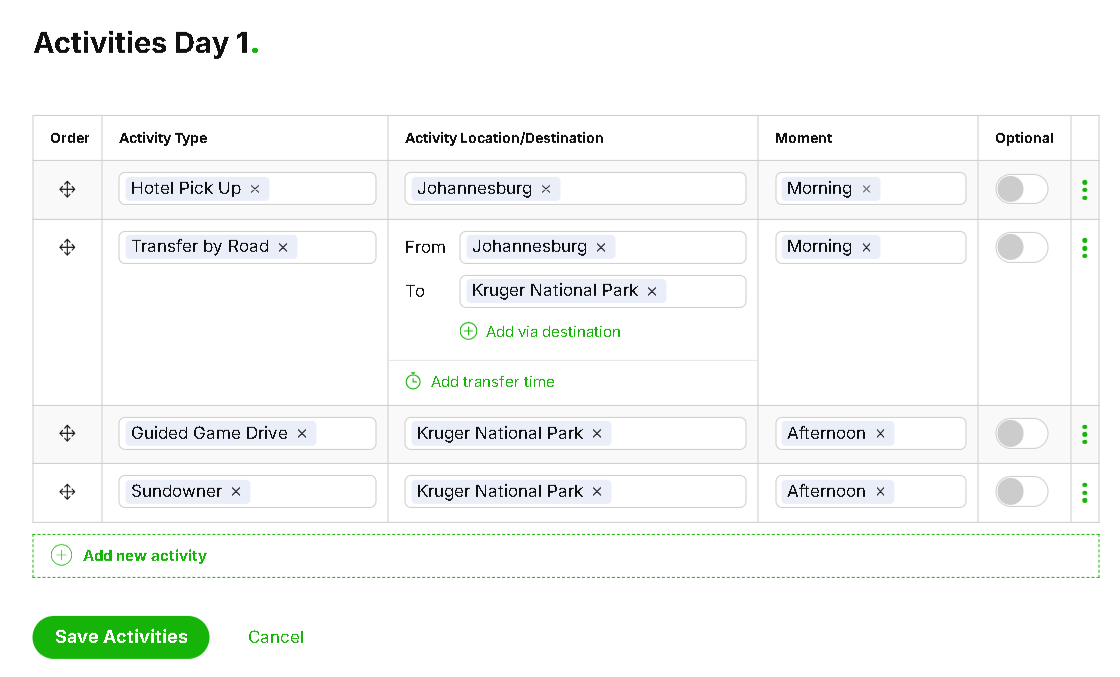
For example if the tour will begin with a hotel pickup in Johannesburg in the morning you can select the activity type ‘Hotel pick-up’ as the ‘activity type’
Thereafter fill in ‘Johannesburg’ as the Activity Location/Destination
The final field will be ‘Morning’ under the column ‘Moment’
To add more activities click on the green text ‘Add new Activity’
Search the SafariOffice database for the chosen activity (Transfer by Road, guided game drive, sundowner etc.) and select the one that best applies. Then you can optionally add a location and moment to that activity
If you would like to change the order, click on the directional pointer symbol on the left under the column ‘order’ .
From here simply drag and drop the activity to the correct order in the list.
Always remember to click the button ‘Save Activities’ to save your work
Please refer to a sample days activities (for a quote) below :
Some reasons you may need to include optional activities in your itineraries may be because (but aren’t limited to) :
You charge more for a certain activity
Several activities take place at the same time and the client can only choose to partake in one
You are merely recommending an activity to the client but do not intend to facilitate it
To make an activity optional :
Click on the toggle button beneath the ‘optional’ column of the activity in question
In the second step of quote creation ‘Pricing’ you will be able to show the additional fee this activity may incur.
#9 How To Complete The Pricing Page
This tutorial demonstrates how to complete step two (pricing page) of the quote creation process
Flexibility in SafariOffice is a big priority. That is why you are never restricted to the SafariOffice Database!
To add a custom activity :
Type the activity name in the field ‘Activity type’
Click on the dropdown item ‘Create a new Activity named’
This new activity will now be added to your private SafariOffice database.
You are able to save text to this activity which will be saved to your content library
The same is true for pictures you upload (optionally) to this activity
In step 3 ‘Preview and Edit’ you will get an auto generated bullet point of text with the structure ‘moment, Activity name, Activity location’. Feel free to edit this text.
How to Add a Custom Description to Your Content Library
In this article, we explain how to add a custom description to Your Content Library.
Click below to navigate to the next part of the onboarding series :
#7 How to Add the Meal Plan
A demonstration of how to add the meal plan to step one of the quote creation process
