Only Admin users can change price plans. You can switch from monthly to yearly and from yearly to monthly. The switch will go into effect automatically at the next renewal date.
You can switch plans using the 'switch plan' link in the subscription section.
Go to Settings > Subscriptions & User Accounts > Subscriptions
In the column Pricing Plan you can use the link below the current plan to switch to another plan for your Extra Paid User Accounts or Add-ons you have activated.
Choose Switch to monthly OR Switch to yearly depending on your current plan.

In the window that opens now confirm you want to switch to the other plan by clicking:
Save & Activate (monthly or yearly) plan.
In the window that opens now confirm you want to switch to the other plan by clicking:
Save & Activate (monthly or yearly) plan.
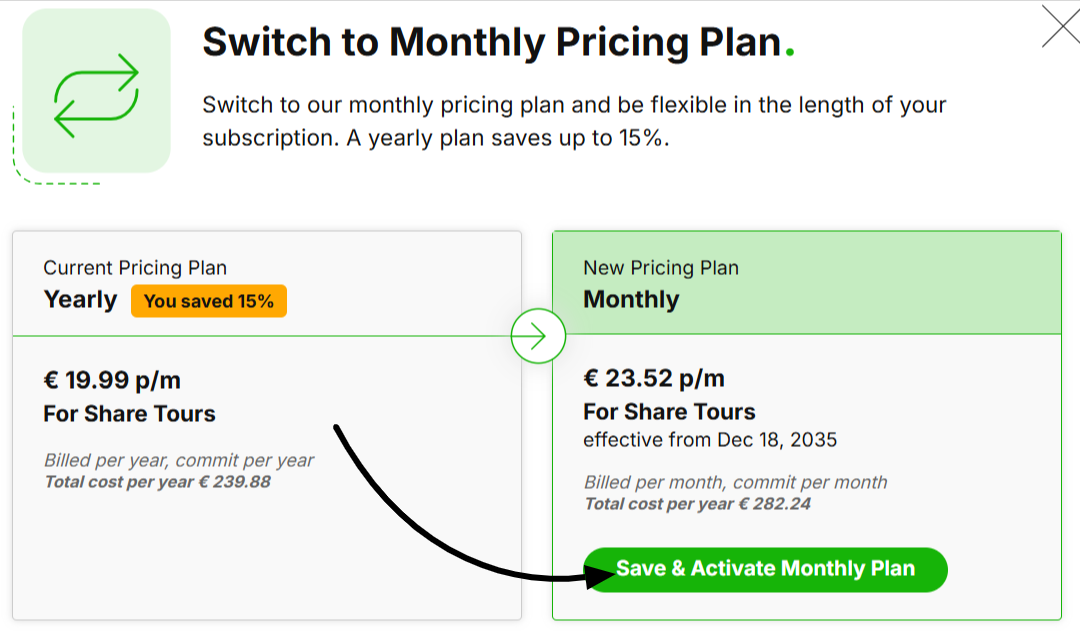
The new plan will be activated from the next renewal date.
In the column 'status' you will find confirmation of this and the date it will go into effect.
If you have more than two user accounts you will be charged for the third user and up. When you add your first extra user (the third user) you will be asked what price plan you like, monthly or yearly payment. After you have chosen a monthly or yearly plan all the users you add after will have the same plan. You can also switch this plan for all users at once.
If you made a mistake or you changed your mind you can still cancel the switch by clicking 'revert switch' in the price plan column. You can do this until the next renewal date without incurring any extra cost.


With a monthly plan, you have more flexibility as you commit to a maximum of one month. It's good if you have a very flexible workforce or want to try out a new Add-on for a short period without wanting to commit for a longer period.
