
In SafariOffice you reactivate canceled user accounts.
If for instance a user comes back after a few months of leave or when they only work for you once in a while (as a freelancer).
Go to your user accounts: Setting > Subscription & User Accounts > Users
Below the table with users click on 'Show canceled user accounts'.

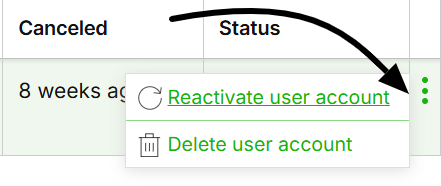
Click on the three green dots on the right of the user you want to reactivate
Now choose 'reactivate user account'.
Optionally: If this is the third user you activate it's possible to choose a Payment Method.
Click 'Reactivate user'.
The account will now be active again.
Related Articles
How to Add a New User to Your Account.
Adding your team or colleagues to SafariOffice.