
When managing tour templates in SafariOffice, you can lock each tour template to prevent accidental or unauthorized edits. This is useful when multiple users access your account, helping to maintain the integrity of your templates.
For example, if you lock a detailed safari package template, it ensures that critical information remains unchanged unless modifications are approved.

NOTE: Only admin users have the authority to lock or unlock a template.
To manage your user account type, go to user settings or read more about User Accounts here.
Locking (or Unlocking) a Template
Go to Tours Template
Find the template you want to lock
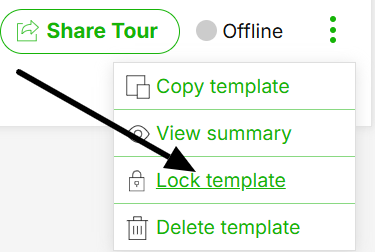
Click the three green dots at the bottom right of that template.
Select 'Lock template (or unlock)'.
The Template is now locked and can't be edited unless you unlock it.