If you don't have a bank-issued Visa or Mastercard, you may still be able to pay for your SafariOffice subscription using a virtual visa card linked to your mobile money account.
This is especially useful for tour operators across East Africa who prefer using mobile payment services.
Safaricom customers can use M-PESA GlobalPay, a virtual Visa card that lets you pay on any website or app that accepts Visa, including SafariOffice.
A registered Safaricom M-PESA account
The latest M-PESA App
Sufficient funds in your M-PESA wallet
Open the My OneApp.
Scroll down to Do more with M-PESA
Tap Global Payments.
Choose M-pesa Visa Card(Globalpay)
Follow the prompts to create your virtual Visa card.
Fund your card directly from your M-PESA wallet.

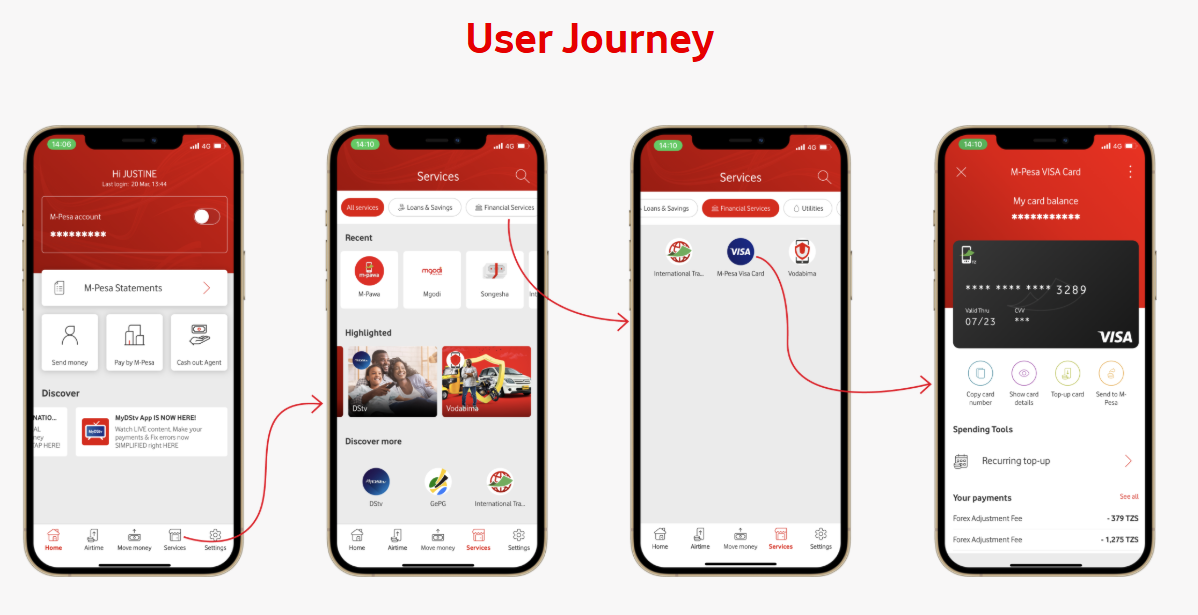
Vodacom M-Pesa customers in Tanzania can also create a virtual Visa card for international online payments.
A registered Vodacom M-Pesa account
Sufficient funds in your M-Pesa wallet
Dial *150*01#
Choose Huduma za kifedha
Select M-Pesa Visa Card
Choose Create Card
Open the M-Pesa App.
Go to Services.
Select Financial Services.
Choose Mpesa Visa Card
Fund it directly from your M-Pesa wallet.
Once created, you'll receive:
16-digit Visa card number
Expiry date
CVV security code
You can then use these details to pay for your SafariOffice subscription online.

